Secure Boot is a security feature built into almost every modern computer and server. When the machine starts, it checks that the software loading before Windows is genuine, so malware can’t hide underneath Windows where antivirus can’t see it. It relies on digital certificates from Microsoft, stored in the computer’s firmware.
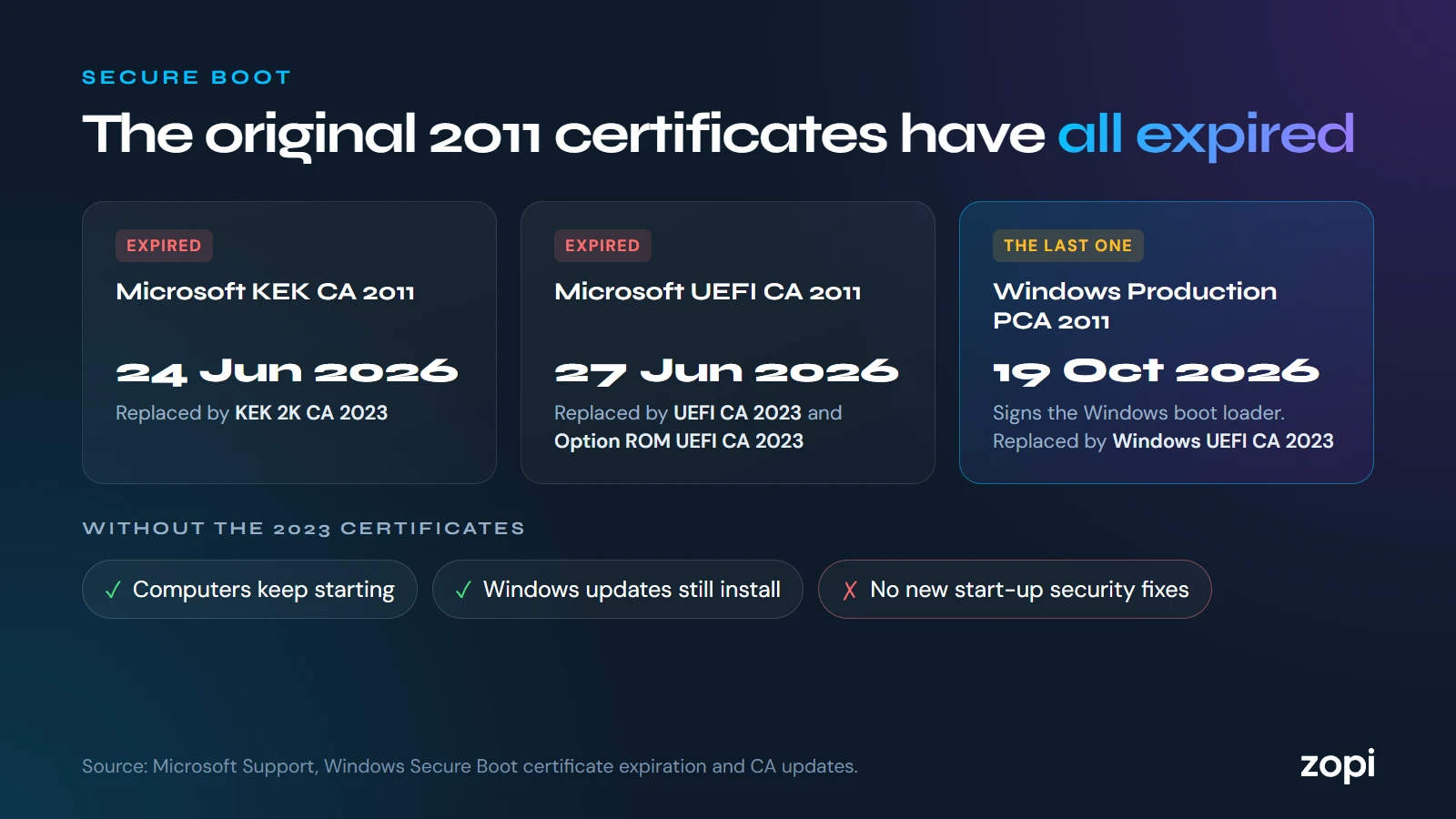
The original certificates were issued in 2011, and they expired this year:
- Microsoft Corporation KEK CA 2011: 24 June 2026
- Microsoft UEFI CA 2011: 27 June 2026
- Microsoft Windows Production PCA 2011, which signs the Windows boot loader: 19 October 2026
Microsoft has issued replacement certificates, dated 2023, to take their place.
What happens to a computer without the new certificates?
Microsoft says these computers will keep starting and working normally, and ordinary Windows updates will still install. But they won’t be able to get new security protections for the start-up process: updates to the Windows Boot Manager, to the list of blocked boot software, and fixes for newly found start-up vulnerabilities.
Over time, Microsoft says this may also affect things that rely on Secure Boot, such as BitLocker drive encryption hardening and some third-party start-up software.
Do I need to do anything?
For most Windows computers, the new certificates arrive automatically through Windows Update. Some need a firmware (BIOS) update from the computer’s maker first.
The machines most likely to have been missed are:
- servers, and computers whose updates are managed by IT, where Microsoft expects administrators to roll out the change themselves
- older computers whose makers haven’t released a firmware update
- computers that are rarely switched on or connected
What to do
- Check your computers and servers have the 2023 certificates, starting with servers and anything that can be reached from the internet
- Install firmware updates from the makers where needed
- Make sure you have the BitLocker recovery key for each encrypted computer before changing firmware or Secure Boot settings, in case a computer asks for it when it restarts
- Don’t turn Secure Boot off to get around a problem: it leaves the computer less protected
How Zopi can help
On managed IT support we check and update firmware and Secure Boot on the computers and servers we look after, and keep your BitLocker recovery keys safe. If you’d like your machines checked, call us on 0204 502 1288.
Sources
- Windows Secure Boot certificate expiration and CA updates, Microsoft Support
- Act now: Secure Boot certificates expire in June 2026, Windows IT Pro Blog, Microsoft