Windows 11 gets a new version every year, and each one only gets security updates for a set time. For Windows 11 version 24H2 on the Home and Pro editions, that time ran out in October 2026. The security update on 13 October was the last one.
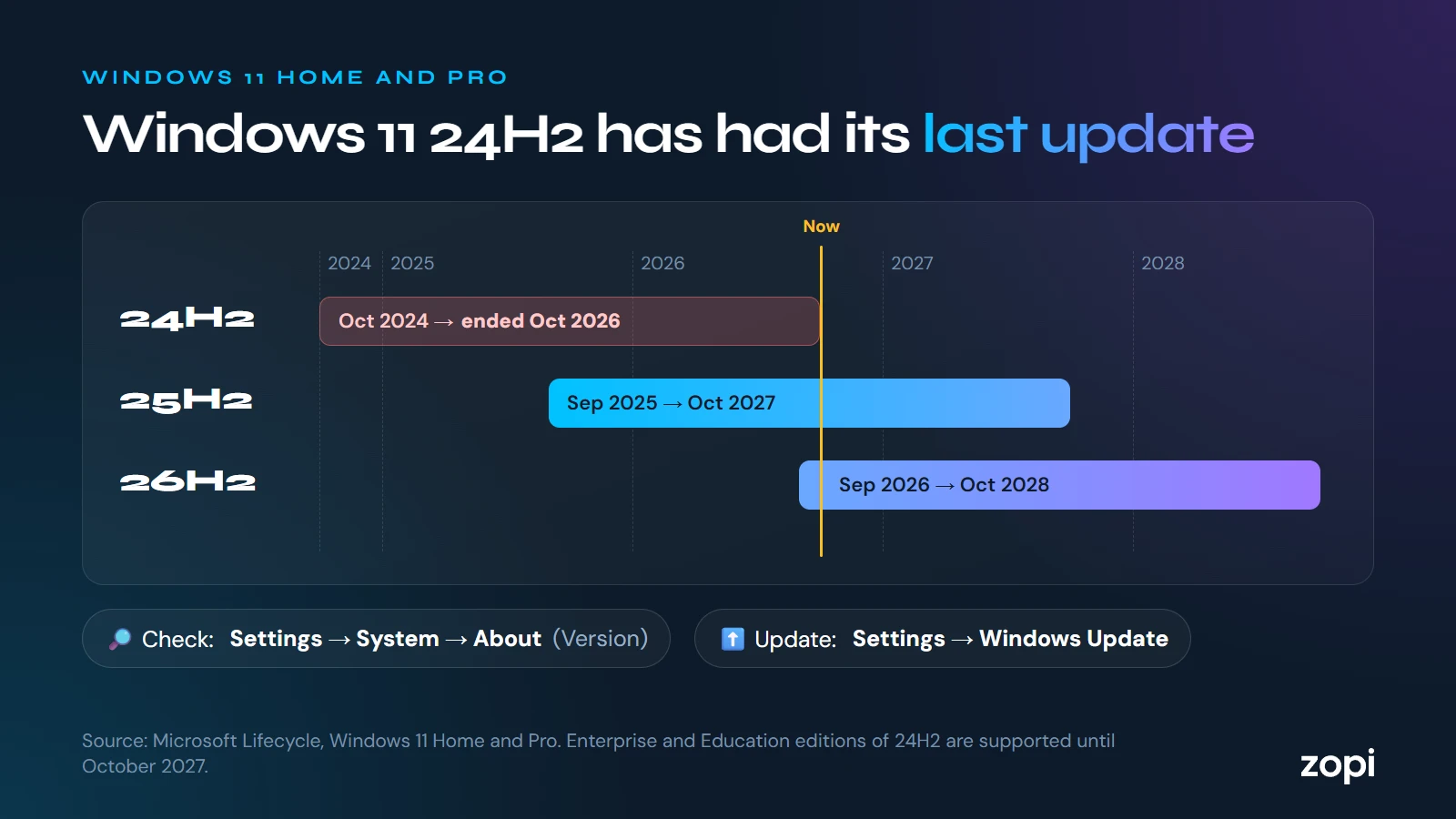
A computer still on 24H2 will keep working, but from November it won’t get fixes for newly found security flaws, and there were more than 1,400 in October alone.
Which computers are affected?
Computers running Windows 11 Home, Pro, Pro for Workstations or Pro Education, on version 24H2. Enterprise and Education editions of 24H2 are supported for longer, until October 2027.
To check a computer:
- Open Settings → System → About
- Under Windows specifications, look at Edition and Version
Or press the Windows key, type winver and press Enter.
Which version to move to
Microsoft’s support dates for the current versions are:
- Version 25H2: updates until October 2027
- Version 26H2, released on 29 September 2026: updates until October 2028
Moving to either is free. For a computer already on 24H2, moving to 25H2 is a small update with one restart, because the two versions share most of their code.
How to update
- Open Settings → Windows Update
- Select Check for updates
- If a new version is offered, select Download and install, then restart when it asks
Microsoft has already moved many home computers automatically. Business computers whose updates are managed by IT often aren’t moved automatically, so they’re the ones most likely to have been left behind.
If a computer isn’t offered a newer version, it may have a hardware or driver problem that’s holding it back. That’s worth looking into rather than leaving.
How Zopi can help
On managed IT support, we keep every computer on a supported version of Windows as part of the service, and plan upgrades with you so they don’t get in the way of work. Not sure where your computers stand? Call us on 0204 502 1288 and we’ll check.
Sources
- Windows 11 Home and Pro: lifecycle, Microsoft Learn
- Microsoft October 2026 Patch Tuesday, BleepingComputer, 13 October 2026