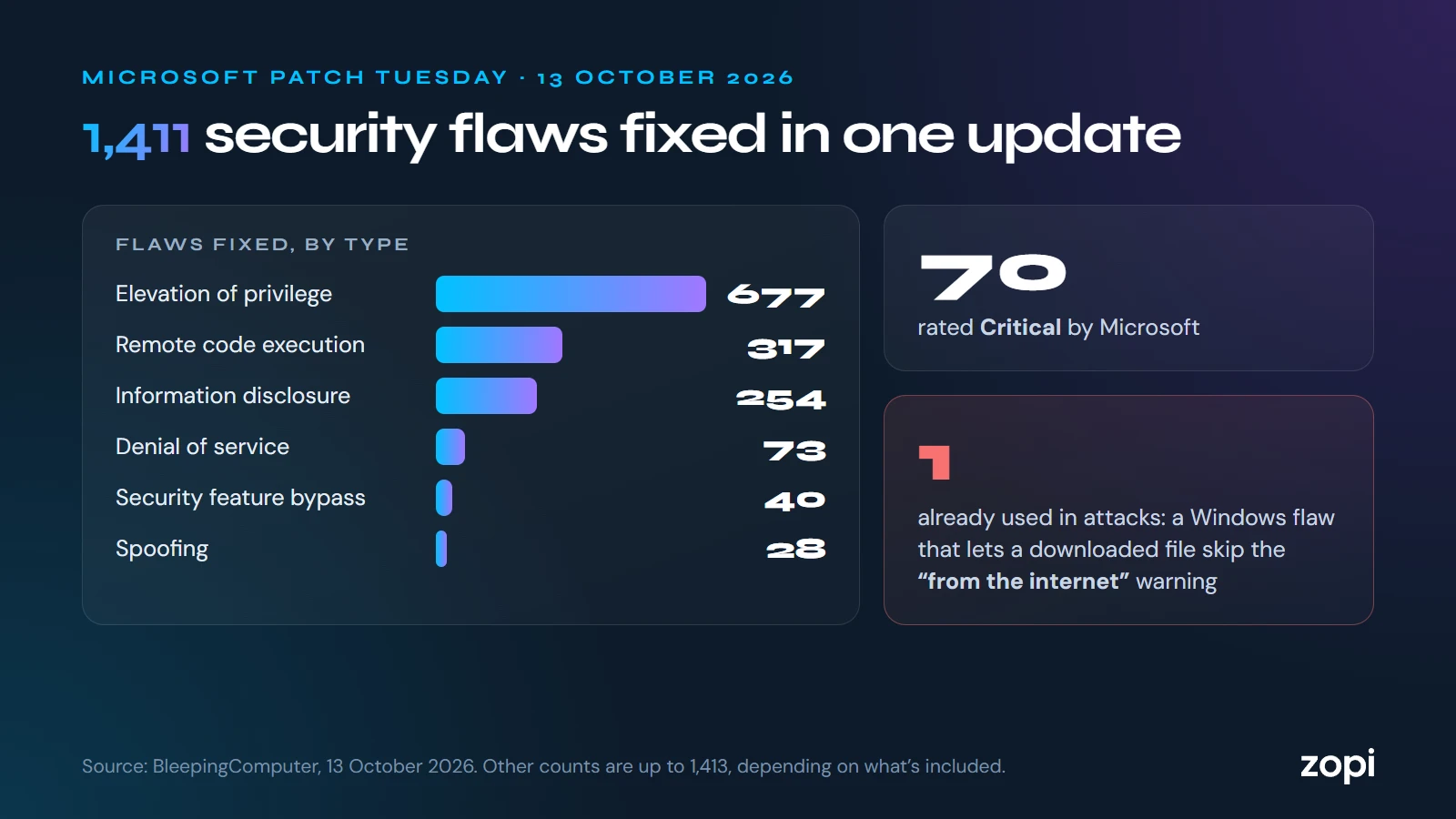
On Tuesday 13 October 2026, Microsoft released its monthly security updates, and they were the biggest it has ever shipped: fixes for more than 1,400 security flaws across Windows, Office, SharePoint and its other products. BleepingComputer counted 1,411 and SecurityWeek 1,413; the totals differ slightly depending on how each one counts. Microsoft rated 70 of them Critical.
One flaw is already being used in attacks
The most urgent fix is for CVE-2026-96951, a flaw in the Windows Shell that attackers were already using before the fix came out.
It lets an attacker get around Mark of the Web, the label Windows puts on files that came from the internet or an email. That label is what makes Windows warn you before opening a downloaded file, and what makes Office open attachments in Protected View. With the label stripped, a harmful file can open without those warnings.
Two other flaws were already publicly known before the fix:
- CVE-2026-108398 in the .NET Framework, which can get around Windows Defender Application Control, a tool businesses use to block unapproved apps
- CVE-2026-92707, a less serious denial-of-service flaw in a developer library
Why so many?
BleepingComputer reports that Microsoft is using AI tools to find and fix weaknesses in its own products, so far more are being found than before. Expect large monthly updates to become normal.
The last update for some versions of Windows
This was also the last update for Windows 11 version 24H2 Home and Pro. If any of your computers are still on 24H2, they won’t get next month’s fixes. Here’s what to do.
What to do now
- Install October’s updates and restart. Many updates only take effect after a restart, and a computer that’s never switched off may be waiting
- Check every computer and server has actually updated, including ones that were off or out of the office
- Take extra care with downloaded files and attachments you weren’t expecting, especially until every computer is updated
- Check your Windows version on each computer (Settings → System → About)
How Zopi can help
On managed IT support, installing Microsoft’s monthly updates and checking they’ve worked is part of the service, and we chase up any computer that’s missed them. If you look after your own IT and want a hand, call us on 0204 502 1288.
Sources
- Microsoft October 2026 Patch Tuesday fixes 1,411 flaws, 3 zero-days, BleepingComputer, 13 October 2026
- Microsoft patches record 1,413 vulnerabilities, including exploited Windows zero-day, SecurityWeek
- Security Update Guide, Microsoft